# INTRODUCTION

SCR API for Freight forwarders and Transporters.

This documentation contains an overview of the **Freight Forwarders** and **Transporters API** functionality that is available in the current version. This is including notifications and callback mechanism, authentication and the sandbox API.

The **SCR API specification** document provides the latest API specification and relevant information, including the Sandbox API.

For the SCR API for Barges specification, please [contact us](mailto:sales@t-mining.be?subject=SCR%20API%20for%20barges%3A%20specification).

{% hint style="info" %}

#### Get notified on important API updates.

To make sure you get informed on new updates we do to the API that might impact your implementation please click below.

[Subscribe here](#upgrading-to-the-latest-api-version).
{% endhint %}

***

### Upgrading to the latest API version.

{% hint style="danger" %}
Please note that if you are not using the latest version of the API it may not support all functionalities described in this document.&#x20;
{% endhint %}

***

### **Download Docs**

[**API Documentation (PDF)**](https://www.securecontainerrelease.com/s/SCR-API-Specification.pdf)\
The latest API specification and relevant information, including the Sandbox API.

[**Infrastructure requirements**](https://www.securecontainerrelease.com/s/Flyer-SCR-API.pdf) \
**D**etailed information on server and network requirements, authentication, and more.

<details>

<summary>PROCEDURE</summary>

1. **Download** the latest version of the API from [this ](https://www.securecontainerrelease.com/downloads)page.
2. **Copy** the existing executable/build as a back-up.
   1. WINDOWS: "C:/Program Files/TMining/wallet/api.exe".
   2. LINUX: "/root/wallet/api".
3. **Rename** the new executable-file to:
   1. WINDOWS: "api.exe".
   2. LINUX: "api-linux-x64";
      1. make the file executable afterwards (*chmod +x*).
4. **Paste** it in the correct directory (see above).
5. **Restart** the service.
   1. WINDOWS: restart the correct "T-Mining API Service" in the services-panel.
   2. LINUX: restart the correct "TMiningAPI"-service with:
      1. *monit*
      2. *monit reload*
      3. *monit restart TMiningAPI*
      4. *monit status* (to check the status)

Need assistance?

Contact the support team (<support@securecontainerrelease.com>).\*

More information about the SCR API can be found [here](https://www.securecontainerrelease.com/scr-api).\*\*

</details>


# GUIDELINES

The SCR API is a standard **REST-API** and in that respect, there will be few surprises for your developers. However, to guarantee the future performance and stability of the application, we would like to stress that the guidelines listed below have to be taken into account when interacting with the API.

## Alway use event notifications instead of polling

{% hint style="info" %}
**Polling** the SCR API should be **avoided** since it will create unnecessary transactions on the blockchain network and therefore can affect the performance of your integration but also of the other parties in the network.
{% endhint %}

Therefore, you should use the event notification mechanism to receive updates and new releases, and process them in your internal system. This is a very simple mechanism where you register a callback url once and afterwards, all release events will be notified on that callback url. When an event comes in your system can retrieve the details by calling the API, but you should not poll the API for the containers in your transport management system every x minutes.

## Field lengths and definitions

All text fields have a default length of **255 characters**. Only the terms and conditions field has an unlimited length.

## Error handling and time-outs

Since the SCR API connects to other servers in the network, time-outs and other infrastructure related errors are always possible and should be taken into account during development. Retrying a call after a few minutes is the easiest way to deal with this, since most transactions are not time critical.

## Simultaneous transactions

The SCR API can accept simultaneous requests without side effects as long as you are retrieving release information. So, when you send a number of simultaneous calls to the GET /releases endpoint, this will not slow down the responses much.

However, calls that change data or retrieving pins are essentially processed sequentially by the SCR API so sending a lot of requests simultaneously will slow down the responses and this should be taken into account at your side. You can send the requests simultaneously and set the time-out high enough, or you can send only a few requests at the same time.

For **high volumes** of requests we also offer a batch API which can process up to 20 requests simultaneously, providing a higher throughput.&#x20;

Please contact us if you want to use these **BATCH** endpoints.


# AUTHENTICATION

### General Principles for Authentication

The communication between your system and the SCR API requires authentication via signed JWT (JSON Web Token) tokens.

After installing the SCR API, follow these steps to set up authentication:

1. **Generate a key pair (RSA or ECDSA)** for your system, which will communicate with the SCR API.
2. **Store the key pair** in a file and configure the API to read from this file by setting the full path in the API's configuration file.
3. **Export the public key** from the wallet using the wallet CLI and make sure the public key file is accessible by your system.

For each request from your system to the SCR API:

* Generate a JWT signed with your private key.
* The JWT payload must include the following claim:
  * `exp`: Expiration time. Ensure that the expiration time is short since the JWT should only be used once.

Include the JWT as a Bearer token in the `Authorization` header of the request.

The SCR API verifies the JWT signature using the public key stored in the wallet. If the signature is invalid, the request will be rejected.

#### Callbacks from SCR API

For callbacks from the SCR API to your system, the SCR API will generate and sign the JWT. Your system must:

* Retrieve the JWT from the `Authorization` header.
* Verify the JWT signature with the public key of the SCR API.
* Check the expiration time of the JWT.

If you cannot process a Bearer token in the headers, you can configure the system to include the token in the body by setting `subscriptionAuthTokenInBody` to `true` in the `configuration.json` file.


# Method.

Setting the Authentication Method for the API

In the **`configuration.json`** file (located in **`api`** directory), there is an **`authentication`** setting. You can choose the preferred authentication method:

1. **No authentication** - remove the line:

```json
"authentication": "publicKey.pem",
```

2. **Public/Private key authentication** - specify the `.pem` file with the public key:

```json
"authentication": "publicKey.pem",
```

3. **Secret-based authentication** - create a file containing the secret and specify the filename:

```json
"authentication": "secret.txt",
```

Ensure that the file contains only the secret (no newlines). For example, you can create it on Linux:

```bash
echo -n 'secret' > secret.txt
```

After updating the configuration, restart the API service to apply the changes.

#### JWT Token Guidelines

Please take into consideration these guidelines when generating the JWT token:

* the expiration date should be included as an **integer**, not a string;
* the secret has to be **base64** encoded in the token;
* the token should be encoded with **base64URL**.

{% hint style="info" %}
You can also to [set the authentication method directly in the configuration file.](/getting-started/authentication/using-the-configuration-file.#set-authentication-endpoint-in-configuration-file)
{% endhint %}


# Using the configuration file.

### Set authentication endpoint in configuration file

To enhance security and flexibility, you can directly set the notification endpoints in the **`configuration.json`**-file.

Example configuration for notification endpoints:

```json
"event_callbacks": [
  {
    "type": "onRelease",
    "url": "https://my-url.com/tmining",
    "secret": "wbLF2qz8bbsWY6"
  }
]
```

You can configure multiple callbacks by listing them in an array, allowing you to set different endpoints for different types of notifications.

***

### Set API Network Settings in configuration file.

The **`configuration.json`** file also contains network settings:

* On line 2, you can enable or disable SSL by setting the protocol to either **`https`** (for SSL) or **`http`** (without SSL):

  ```json
  "protocol": "https",
  ```
* If SSL is enabled, specify the certificates to use:<br>

  ```json
  "httpServer": {
    "port": 4431,
    "ssl": {
      "serverCert": "certificates/server-cert.pem",
      "serverKey": "certificates/server-key.pem"
    }
  }
  ```
* On line 32, you can update the port number used for incoming requests:<br>

  ```json
  "httpServer": {
    "port": 5000
  }
  ```

{% hint style="danger" %}
Restart the API service after modifying these settings.
{% endhint %}

***

### Set logging parameters in configuration file.

You can fine-tune logging by modifying the **`log4js`** section in the **`configuration.json`-**&#x66;ile. The most important setting is the **`level`** parameter:

#### Default logging, level setting - `debug`

```json
"level": "debug"
```

#### Increased logging, level setting - `trace`&#x20;

```json
"level": "trace"
```

{% hint style="danger" %}
Please note: the "trace" will generate a lot of logging.\*
{% endhint %}

***

### Configure log, file settings.

**EXAMPLE** for compressing the logs automatically and using rotating logfiles with a limited size:

```json
"file": {
"type": "dateFile",
"filename": "api.log",
"numBackups": "7",
"compress": true,
"layout": {
"type": "pattern",
"pattern": “%[%d %p [%f{2}:%l]%] %m%n"
}
}
```

Above configuration retains 7 compresse log backups.

{% hint style="success" %}
You can use all the **`log4js`**-settings, which are documented on the

[**OFFICIAL DOCUMENTATION SITE**](https://log4js-node.github.io/log4js-node/file.html).
{% endhint %}


# TESTING & SANDBOX


# Creating a JWT testing token manually.

You can generate a testing token at [jwt.io](https://jwt.io) with your settings and secret, and use Postman for testing it.

<figure><img src="https://3962621206-files.gitbook.io/~/files/v0/b/gitbook-x-prod.appspot.com/o/spaces%2F42KNM6Ikou97oywFeUuW%2Fuploads%2F6jaTKhBpf8fMoH3KjCIb%2Fimage.png?alt=media&amp;token=2b00193a-4d05-4d9c-add8-ebbb42cd0606" alt=""><figcaption></figcaption></figure>

In the JWT payload, only the `iat` (issued at) and `exp` (expiration time) fields are required.

{% code title="Example: Token expires Sep 2024" %}

```json
{
  "iat": 1694080518,
  "exp": 1725702918
}
```

{% endcode %}

In the payload, the expiration date is **key** and should be specified as an **integer** (an epoch). There are no other fields required, so the `“issued at”` and `“expiration time”`-fields are sufficient.


# SANDBOX environment.

To test the basic operations of the API, you can use the following API endpoint in our UAT environment:

#### Test endpoint UAT

```
https://test-admin.securecontainerrelease.com:4430/legacy/tmining/api/v1
```

{% hint style="info" %}
Please note:&#x20;

* These endpoints do not use authentication, so you can use them without tokens, but in a production environment you should enable authentication
* This also means this data is visible to other companies that are testing in the UAT environment, so please do not add sensitive data
  {% endhint %}

You can retrieve a list of releases using the GET [/releases-endpoint ](/api-reference/releases)and start from there

<figure><img src="https://3962621206-files.gitbook.io/~/files/v0/b/gitbook-x-prod.appspot.com/o/spaces%2F42KNM6Ikou97oywFeUuW%2Fuploads%2Fer06koK4Z4tyePSacB8w%2Fimage.png?alt=media&amp;token=c61227e1-eee7-4e5e-8a95-00c81e528ac7" alt=""><figcaption></figcaption></figure>

#### Postman collection

To allow you to test the whole flow we also have a Postman collection that contains endpoints to do all operations on test releases. This can be obtained from support by emailing <support@securecontainerrelase.com>

<details>

<summary>The Postman collection contains a large list of endpoints</summary>

![](https://3962621206-files.gitbook.io/~/files/v0/b/gitbook-x-prod.appspot.com/o/spaces%2F42KNM6Ikou97oywFeUuW%2Fuploads%2F0Mx254JbB9syA2HTYb9s%2Fimage.png?alt=media\&token=9e7cf003-01bb-4284-af3b-0e8c4e751813)

</details>

{% hint style="info" %}
**It is however important that you follow a basic flow:**

1. A release is created by the carrier
2. By using the “Carrier - Transfer a release” endpoint, you transfer the release to the test

   organization
3. Afterwards the test organization can do a number of transactions using the endpoint

   without “Carrier” in the description
   {% endhint %}

<figure><img src="https://3962621206-files.gitbook.io/~/files/v0/b/gitbook-x-prod.appspot.com/o/spaces%2F42KNM6Ikou97oywFeUuW%2Fuploads%2FCIJkK9iiGcx4MCAFVD8J%2Fimage.png?alt=media&amp;token=47f65b12-6793-41b3-b92e-8afe7bd8446d" alt=""><figcaption></figcaption></figure>


# ERROR CODES

#### General HTTP return codes

<table><thead><tr><th width="146">Code</th><th>Description</th></tr></thead><tbody><tr><td><mark style="color:green;">204</mark></td><td>Success</td></tr><tr><td><mark style="color:red;">401</mark></td><td>Invalid Authorization bearer token</td></tr><tr><td><mark style="color:red;">4xx</mark></td><td>A functional error occurred (see table below)</td></tr><tr><td><mark style="color:red;">500</mark></td><td>Internal server error</td></tr></tbody></table>

#### 500 error code

{% hint style="info" %}
Please note that when a <mark style="color:red;">500</mark> error is returned, the body of the response contains the error code and description in JSON-format. However, this error code always indicates a technical or network problem, so these should not be shown to end-users.
{% endhint %}

{% code title="Example 500 error" %}

```json
{
"code": 1,
"description": "an error"
}
```

{% endcode %}

#### Detailed list of 4xx functional errors

<table><thead><tr><th width="175">Error code</th><th>Event</th></tr></thead><tbody><tr><td><mark style="color:red;">422</mark></td><td>A wrong HTTP verb is used</td></tr><tr><td><mark style="color:red;">403</mark></td><td>A release is retrieved for which you have no access (anymore)</td></tr><tr><td><mark style="color:red;">422</mark></td><td>A release is transferred but the address is an invalid format</td></tr><tr><td><mark style="color:red;">422</mark></td><td>A release is transferred but the address is unknown</td></tr><tr><td><mark style="color:red;">409</mark></td><td>A release is transferred but the release is no longer valid</td></tr><tr><td><mark style="color:red;">409</mark></td><td>A release is transferred but you are not owner anymore</td></tr><tr><td><mark style="color:red;">409</mark></td><td>A release in revoked but you are already the owner</td></tr><tr><td><mark style="color:red;">409</mark></td><td>A release is revoked but the release is no longer valid</td></tr><tr><td><mark style="color:red;">404</mark></td><td>A pin is requested but the address is an invalid format</td></tr><tr><td><mark style="color:red;">404</mark></td><td>A pin is requested but the address is unknown</td></tr><tr><td><mark style="color:red;">404</mark></td><td>A pin is requested but the release is no longer valid</td></tr><tr><td><mark style="color:red;">404</mark></td><td>A pin is requested but you are not owner anymore</td></tr></tbody></table>


# INVITE AN ORGANIZATION

Invites an organization to connect, and exchange releases with.

### <mark style="color:yellow;">`POST`</mark>  /invitations

{% hint style="info" %}
The governance app will handle the actual invitation, which allows the invited organization to register first if they are not yet on the network, and accept (or refuse) your invitation afterwards.
{% endhint %}

**In the body you have to specify:**

* **REFERENCE** (optional)&#x20;
  * Unique and returned when the invited organization has accepted your connection request.
  * This allows you to connect the address of that organization with your internal key (for instance an internal customer number).
  * You can put a client reference number in this field or any other string.
* **NAME** of the organization you want to connect to (mandatory).
* **VAT** number of the organization you want to connect to (mandatory).
* **EMAIL** of contact person in the organization you want to connect to (mandatory);
  * this email address will be used to send the connection request to that organization.

***

**EXAMPLE**

<div data-full-width="false"><figure><img src="https://3962621206-files.gitbook.io/~/files/v0/b/gitbook-x-prod.appspot.com/o/spaces%2F42KNM6Ikou97oywFeUuW%2Fuploads%2FMnvteFZY45ij2VUvTviS%2Fafbeelding.png?alt=media&amp;token=0940d89f-1483-47a8-83eb-d8b78b6bc825" alt=""><figcaption><p>server = <a href="https://URL+PORT/tmining/api/v1">https://url:port/tmining/api/v1</a></p></figcaption></figure></div>


# CONFIGURE EVENT NOTIFICATIONS & WEBHOOKS


# Register a callback url for notifications.

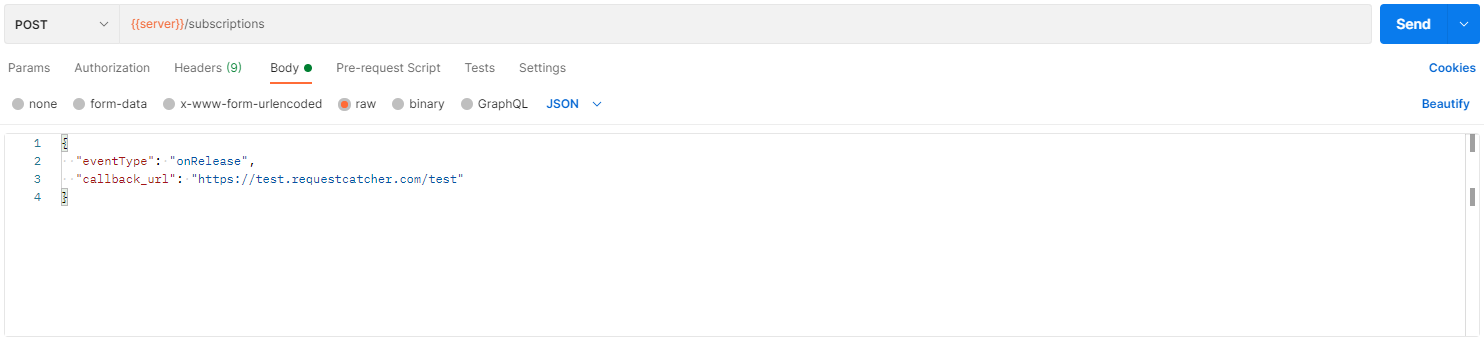
Subscriptions (or webhooks) serve to specify a callback url that should be invoked when an event occurs.

### <mark style="color:yellow;">POST</mark> /subscriptions

#### Request:

```json
{
    "eventType": "string",
    "callback_url": "string"
}
```

**EXAMPLE**

<figure><img src="https://3962621206-files.gitbook.io/~/files/v0/b/gitbook-x-prod.appspot.com/o/spaces%2F42KNM6Ikou97oywFeUuW%2Fuploads%2Fb1AbhcELQwAPze3uZR0Z%2Fafbeelding.png?alt=media&amp;token=eced5cb3-e85d-4716-9a1c-ae13ffd288b6" alt=""><figcaption><p>server = <a href="https://URL+PORT/tmining/api/v1">https://url:port/tmining/api/v1</a></p></figcaption></figure>

The following `event types` are currently supported:

1. [`onRelease` ](/how-to/configure-event-notifications-and-webhooks/event-types./onrelease)
2. [`onAcceptInvitation`](/how-to/configure-event-notifications-and-webhooks/event-types./onacceptinvitation)


# Fetch latest data after receiving event notification.

After receiving a notification, you need to GET the release in order to receive the latest data.

**EXAMPLE:**

{% code title="webhook" %}

```json
{
    "release": "0x24Fc2D465AaAbf47DA7284920A7B5c3b368EC1D9",
    "event": "TRANSFER",
    "organization": "0x78f13e5253a30f0EE079f5DDE281B3F1efe70B94",
    "vat": "BE2020112701"
}
```

{% endcode %}

<figure><img src="https://3962621206-files.gitbook.io/~/files/v0/b/gitbook-x-prod.appspot.com/o/spaces%2F42KNM6Ikou97oywFeUuW%2Fuploads%2FYhTheIK7G2qLB5k0OmMh%2Fafbeelding.png?alt=media&amp;token=3741689e-c83e-44af-a545-8daf2cd51ab9" alt=""><figcaption><p>server = <a href="https://URL+PORT/tmining/api/v1">https://url:port/tmining/api/v1</a></p></figcaption></figure>

{% code title="RESPONSE" %}

```json
{
   "release_data":{
      "billOfLading":{
         "blNumber":"RELEASE-API-TEST-1612",
         "portOfLoading":"BEANR",
         "portOfDestination":"BEANR",
         "vessel":"AAA",
         "agent":"BBB",
         "stayNumber":"00001",
         "lloydsNumber":"0002",
         "voyageNumber":"0003",
         "lineCode":"ABC"
      },
      "container":{
         "containerNumber":"CSQU32345690",
         "containerStatus":"released",
         "pickupLocation":"ECTDCD",
         "turnInLocation":"terminal_locode",
         "turnInReference":"aref",
         "termsAndConditions":"base64 encoded data",
         "validFrom":"2017-01-05T14:00:00.000Z",
         "validUntil":"2025-01-05T14:00:00.000Z",
         "isoTypeCode":"45G1",
         "loadStatus":"full",
         "moveType":"import"
      }
   },
   "address":"0x24Fc2D465AaAbf47DA7284920A7B5c3b368EC1D9",
   "deleted":false,
   "blocked":false,
   "encryptedPin":"18570bfece4999db5cd9b6102f9cff472acb5d7e1470bdde8a03cc3db01a6dc1aaf7e132984e7b2b6d7a07aa021f79c833636d8d9bfe4a62a3bef06567b701c579673768ad435d216050edda2f2b99709cc542b65c226f0bfd4f30c8500a4eba300cd538bc565409fe01d01d0d0c23d42bab76c7efe283e89f6e94a5f1b663141aecfe3a97bfeb826996656f622d97e05d4dd7f950f15a9312c507a90ed58f435b13878adf09d2c727fb518ba8d566bbb8c9a9fb2a1a6fefa73a55ec6bc05b14dc6f3cacd201a941f9af018ab1e54f88e0d031e92968a99fa16f9359b8fb943409736f7d2d20ee0011ed1a817e1a12cd760b9473077b6daa533521563dcaf322d6674a4b4417dd09a42a228211289bfedcd07529f983cd26387abfe2b1cd4b6817635d788d6d855104055f7ed6102f0604ac4382204eddfb9e62a9a3c199182319c948d0dabfc62080a93b0c8dac0067431751a4e1e9864fd5d548cd93f9c4edb0b95e0edb500f7846ee05dd13d7578f06c26d11ef107dd0713cc1b42f2e70a75a1a70b5ba107c2eeb6b1aba0723dbf3f8eee674a8ba3ff41da47d9fb91587d9e9c4143f4dadb2c9aa61b444c953720108af392ff3ff85a21542a2100eff453b8c9ffc307200b2fce89a2284716ab14a05b133c22b58359cf9183522fdab46cf033a39c7b262bb7e1015be8c6af837a0a48993a31600db207505f3c9ea1f1c3e",
   "gateOut":null,
   "createdAt":"2021-12-20T14:17:05.623Z",
   "updatedAt":"2022-02-16T08:52:13.251Z",
   "owner":"0x79F98099b2Bf4e5a47244E0cDba500F68b567ce5",
   "creator":"0xa2039dC115B5904c224FEc057684fcCcc88E2f05",
   "greenLights":{
      "total":"green",
      "events":{
         "customs":{
            "color":"green",
            "value":"released",
            "updatedAt":"2023-07-10 13:00"
         },
         "pickuplight":{
            "color":"gray",
            "value":"unknown",
            "updatedAt":""
         },
         "gateoperation":{
            "color":"green",
            "value":"gateoutreceived",
            "updatedAt":"2023-07-12 14:16"
         },
         "terminalready":{
            "color":"green",
            "value":"released",
            "updatedAt":"2023-07-10 12:00"
         },
         "customsprogress":{
            "color":"gray",
            "value":"unknown",
            "updatedAt":""
         },
         "commercialrelease":{
            "color":"green",
            "value":"ok",
            "updatedAt":"2023-07-05 13:37"
         },
         "terminaloperation":{
            "color":"green",
            "value":"discharged",
            "updatedAt":"2023-07-10 11:50"
         }
      },
      "source":"NxtPort"
   },
   "version":"1.2.1",
   "pinRetrieved":false,
   "previousOwner":"0xa2039dC115B5904c224FEc057684fcCcc88E2f05",
   "nextOwner":null,
   "conditions":[
      
   ]
}
```

{% endcode %}

{% hint style="info" %}
Please note that almost all fields in the release details (from the GET /releases-endpoints) can be updated by the carrier.
{% endhint %}

Please find a list below of these fields:

<table><thead><tr><th width="247">Field</th><th width="162">Can be updated?</th><th width="104">By who?</th><th>Is updated in practice?</th></tr></thead><tbody><tr><td><strong>billOfLading</strong></td><td></td><td></td><td></td></tr><tr><td><code>blNumber</code></td><td>yes</td><td>carrier</td><td>no</td></tr><tr><td><code>portOfLoading</code></td><td>yes</td><td>carrier</td><td>no</td></tr><tr><td><code>portOfDestination</code></td><td>yes</td><td>carrier</td><td>no</td></tr><tr><td><code>vessel</code></td><td>yes</td><td>carrier</td><td>no</td></tr><tr><td><code>agent</code></td><td>no</td><td></td><td></td></tr><tr><td><code>stayNumber</code></td><td>yes</td><td>carrier</td><td>no</td></tr><tr><td><code>lloydsNumber</code></td><td>yes</td><td>carrier</td><td>no</td></tr><tr><td><code>voyageNumber</code></td><td>yes</td><td>carrier</td><td>no</td></tr><tr><td><strong>container</strong></td><td></td><td></td><td></td></tr><tr><td><code>containerNumber</code></td><td>yes</td><td>carrier</td><td>no</td></tr><tr><td><code>containerStatus</code></td><td>yes</td><td>SCR app</td><td>Yes, when the carrier blocks or unblocks a release this field is updated.</td></tr><tr><td><code>pickupLocation</code></td><td>yes</td><td>carrier</td><td>Yes, when the pickup location (deep sea terminal) changes.</td></tr><tr><td><code>turnInLocation</code></td><td>yes</td><td>carrier</td><td>Yes, when the turn in location (depot) changes.</td></tr><tr><td><code>turnInReference</code></td><td>yes</td><td>carrier</td><td>Yes, when the turn in location (depot) changes.</td></tr><tr><td><code>termsAndConditions</code></td><td>yes</td><td>carrier</td><td>no</td></tr><tr><td><code>validFrom</code></td><td>yes</td><td>carrier</td><td>no</td></tr><tr><td><code>validUntil</code></td><td>yes</td><td>carrier</td><td>Yes, when the validity period is updated.</td></tr><tr><td><code>isoTypeCode</code></td><td>yes</td><td>carrier</td><td>no</td></tr><tr><td><code>address</code></td><td>no</td><td></td><td></td></tr><tr><td><code>deleted</code></td><td>yes</td><td>carrier</td><td>no</td></tr><tr><td><code>blocked</code></td><td>yes</td><td>carrier</td><td>Yes, this can occur when a container has to be scanned or when the carrier blocks the release temporarily.</td></tr><tr><td><code>encryptedPin</code></td><td>yes</td><td>SCR app</td><td>Yes, when the PIN is updated, for instance when the release is revoked while the pin was already retrieved.</td></tr><tr><td><code>gateOut</code></td><td>yes</td><td>terminal</td><td>Yes, when the container leaves the terminal.</td></tr><tr><td><code>createdAt</code></td><td>no</td><td></td><td></td></tr><tr><td><code>updatedAt</code></td><td>yes</td><td>SCR app</td><td>Yes, when a release is updated.</td></tr><tr><td><code>owner</code></td><td>yes</td><td>SCR app</td><td>Yes, when a release is transferred or revoked.</td></tr><tr><td><code>creator</code></td><td>no</td><td></td><td></td></tr><tr><td><code>version</code></td><td>no</td><td></td><td></td></tr><tr><td><code>pinRetrieved</code></td><td>yes</td><td>SCR app</td><td>Yes, when the pin is retrieved.</td></tr><tr><td><code>previousOwner</code></td><td>yes</td><td>SCR app</td><td>Yes, when a release is transferred or revoked.</td></tr><tr><td><code>nextOwner</code></td><td>yes</td><td>SCR app</td><td>Yes, when a release is transferred or revoked.</td></tr><tr><td><code>conditions</code></td><td>yes</td><td>carrier</td><td>no</td></tr><tr><td><code>greenLights</code></td><td>yes</td><td>Nxtport</td><td>Yes.</td></tr></tbody></table>


# Retrieve missing event notifications using the API.

If you missed or did not process event notifications using the callback, you can retrieve the missing events using an API call.

{% hint style="info" %}
Please note that this is not intended to build up an audit trail. If you require that functionality, please use the [audittrail](/api-reference/audittrail)-endpoint.
{% endhint %}

You can retrieve the events using the endpoint below:

<figure><img src="https://3962621206-files.gitbook.io/~/files/v0/b/gitbook-x-prod.appspot.com/o/spaces%2F42KNM6Ikou97oywFeUuW%2Fuploads%2FeFrr2FKlTOWkDNpBj9wo%2Fafbeelding.png?alt=media&amp;token=649f9801-26ed-4b76-847b-3009b3e4df39" alt=""><figcaption><p>server = <a href="https://URL+PORT/tmining/api/v1">https://url:port/tmining/api/v1</a></p></figcaption></figure>

#### PAGING

Parameters you can use for paging:

<table data-header-hidden><thead><tr><th width="151"></th><th></th></tr></thead><tbody><tr><td><strong>limit</strong></td><td>Maximum number of records to return.</td></tr><tr><td><strong>page</strong></td><td>Page number, to be used with limit.</td></tr><tr><td><strong>from</strong></td><td>Timestamp from which you want to receive events.</td></tr><tr><td><strong>until</strong></td><td>Timestamp to which you want to receive events.</td></tr></tbody></table>

These parameters can be used on its own or in combination with others. The output is a list of events similar to the events you receive using the callback.

#### EXAMPLE

{% code title="RESPONSE" %}

```json
[
    {
        "release": "0x597aFbB1D0E48d2caf4b544817D4c6Eb66a6F8Df",
        "event": "TRANSFER",
        "organization": "0x79F98099b2Bf4e5a47244E0cDba500F68b567ce5",
        "vat": "SS11111333",
        "when": "2024-03-01T09:32:31.492Z"
      },
      {
        "release": "0x597aFbB1D0E48d2caf4b544817D4c6Eb66a6F8Df",
        "event": "TRANSFER",
        "organization": "0x79F98099b2Bf4e5a47244E0cDba500F68b567ce5",
        "vat": "SS11111333",
        "when": "2024-03-01T09:34:21.490Z"
      },
      {
        "release": "0x597aFbB1D0E48d2caf4b544817D4c6Eb66a6F8Df",
        "event": "ENTITY_ASSIGN",
        "organization": "0x79F98099b2Bf4e5a47244E0cDba500F68b567ce5",
        "vat": "SS11111333",
        "when": "2024-03-01T09:39:52.210Z"
    }
]
```

{% endcode %}


# Event types.

## onRelease

The `onRelease` event type covers when any of the following events takes place:

1. a release has been **transferred** to your organization
2. a release that has been **transferred** to your organization and is:
   1. updated
   2. blocked
   3. unblocked
   4. deleted
   5. revoked

{% hint style="info" %}
Please note that for transfers and revokes of releases that are executed by your own organization (through the API or web app), a notification is also sent to the callback endpoint.&#x20;
{% endhint %}

This way you can update your internal systems when releases are transferred or revoked manually, in the SCR web application.

#### onRelease Payload&#x20;

When the `onRelease` event occurs, the callback is invoked with the following data:

<table><thead><tr><th width="174">Value</th><th>Description</th></tr></thead><tbody><tr><td><code>release</code></td><td>The address of the release</td></tr><tr><td><code>event</code></td><td><p>A string denoting the event, being one of the following: </p><p><code>transfer</code>, <code>update</code>, <code>block</code>, <code>unblock</code>, <code>delete</code>, <code>revoke</code>*, <code>greenlights</code></p></td></tr><tr><td><code>organization</code></td><td>The address for which the event is reported</td></tr><tr><td><code>vat</code></td><td>The VAT no of the organization for which the event is reported</td></tr></tbody></table>

*The last two fields are added for organizations with multiple legal entities. This way, you can collect the notifications using one endpoint and route them to the correct (internal) system using these fields.*

&#x20;*\** For `revoke` action, the following parties are notified:

* If the API is version 1.2.3 or lower only the current and the new owner receive a notification in the API
* If the API is version 1.2.4 or higher all organizations that are in the ownership chain of the release receive a notification in the API

#### Examples

Please see below examples of `onRelease` events:

{% tabs %}
{% tab title="Transfer to your organization" %}

```json
{
"release": "0x24Fc2D465AaAbf47DA7284920A7B5c3b368EC1D9",
"event": "TRANSFER",
"organization": "0x78f13e5253a30f0EE079f5DDE281B3F1efe70B94",
"vat": "BE2020112701"
}
```

{% endtab %}

{% tab title="Green lights updated" %}

```json
{
"release": "0x24Fc2D465AaAbf47DA7284920A7B5c3b368EC1D9",
"event": "GREENLIGHTS",
"organization": "0x78f13e5253a30f0EE079f5DDE281B3F1efe70B94",
"vat": "BE2020112701"
}
```

{% endtab %}
{% endtabs %}

{% hint style="info" %}
After you have received the event you would want to [retrieve the latest data](/how-to/configure-event-notifications-and-webhooks/fetch-latest-data-after-receiving-event-notification.)
{% endhint %}


# onRelease

The onRelease event type covers when any of the following events takes place:

1. A release has been **transferred** to your organization.
2. A release that has been **transferred** to your organization and is:
   1. **updated**;
   2. **blocked**;
   3. **unblocked**;
   4. **deleted**;
   5. **revoked**.

{% hint style="info" %}
Please note that for transfers and revokes of releases that are executed by your own organization (through the API or web app), a notification is also sent to the callback endpoint.&#x20;
{% endhint %}

This way you can update your internal systems when releases are transferred or revoked manually, in the SCR web application.

#### Payload&#x20;

When the `onRelease` event occurs, the callback is invoked with the following data:

<table><thead><tr><th width="174">Value</th><th>Description</th></tr></thead><tbody><tr><td><code>release</code></td><td>The address of the release.</td></tr><tr><td><code>event</code></td><td><p>A string denoting the event, being one of the following: </p><p><code>transfer</code>, <code>update</code>, <code>block</code>, <code>unblock</code>, <code>delete</code>, <code>revoke</code>*, <code>greenlights</code>.</p></td></tr><tr><td><code>organization</code></td><td>The address for which the event is reported.</td></tr><tr><td><code>vat</code></td><td>The VAT no of the organization for which the event is reported.</td></tr></tbody></table>

*The last two fields are added for organizations with multiple legal entities. This way, you can collect the notifications using one endpoint and route them to the correct (internal) system using these fields.*

&#x20;*\** For `revoke` action, the following parties are notified:

* If the API is version 1.2.3 or lower only the current and the new owner receive a notification in the API.
* If the API is version 1.2.4 or higher all organizations that are in the ownership chain of the release receive a notification in the API.

#### EXAMPLES

Please see below examples of `onRelease` events:

{% tabs %}
{% tab title="TRANSFER to your organization." %}

<pre class="language-json"><code class="lang-json">{
    "release": "0x000000000000000000000000000000000000000",
    "event": "TRANSFER",
    "organization": "0x000000000000000000000000000000000000000",
<strong>    "vat": "BETEST"
</strong>}
</code></pre>

{% endtab %}

{% tab title="Update of the Green Lights." %}

<pre class="language-json"><code class="lang-json">{
<strong>    "release": "0x000000000000000000000000000000000000000",
</strong>    "event": "GREENLIGHTS",
<strong>    "organization": "0x000000000000000000000000000000000000000",
</strong>    "vat": "BETEST"
}
</code></pre>

{% endtab %}
{% endtabs %}

{% hint style="info" %}
After you have received the event you would want to [retrieve the latest data](/how-to/configure-event-notifications-and-webhooks/fetch-latest-data-after-receiving-event-notification.).
{% endhint %}


# onAcceptInvitation

The onAcceptInvitation event type serves to get a notification when an invitation has been accepted or refused.

When `onAcceptInvitation` event occurs, the callback will be invoked with the following data:

<table><thead><tr><th width="174">Value</th><th>Description</th></tr></thead><tbody><tr><td><code>reference</code></td><td>The original reference for the invitation <em>(as set on posting the invitation).</em></td></tr><tr><td><code>status</code></td><td>Either accepted or refused.</td></tr><tr><td>organization data</td><td>Data of the connected organization, as received in the connections endpoint.</td></tr></tbody></table>


# RELEASES

The fields illustrated in the [releases](/api-reference/releases)-reference are explained in the table below in greater detail.

{% tabs %}
{% tab title="FIELDS" %}

| FIELD                | EXPLANATION                                                                                                                                                                                                                                                                                                                                                                                                                                                                                                                                                                                                              |
| -------------------- | ------------------------------------------------------------------------------------------------------------------------------------------------------------------------------------------------------------------------------------------------------------------------------------------------------------------------------------------------------------------------------------------------------------------------------------------------------------------------------------------------------------------------------------------------------------------------------------------------------------------------ |
| `blNumber`           | The bill of lading number.                                                                                                                                                                                                                                                                                                                                                                                                                                                                                                                                                                                               |
| `portOfLoading`      | A text description of the port of loading, supplied by the carrier.                                                                                                                                                                                                                                                                                                                                                                                                                                                                                                                                                      |
| `portOfDestination`  | A text description of the port of destination, supplied by the carrier.                                                                                                                                                                                                                                                                                                                                                                                                                                                                                                                                                  |
| `vessel`             | A text description of the incoming vessel, supplied by the carrier.                                                                                                                                                                                                                                                                                                                                                                                                                                                                                                                                                      |
| `agent`              | A text description of the agent that released the container, supplied by the carrier.                                                                                                                                                                                                                                                                                                                                                                                                                                                                                                                                    |
| `stayNumber`         | The stay number of the incoming vessel, supplied by the carrier.                                                                                                                                                                                                                                                                                                                                                                                                                                                                                                                                                         |
| `lloydsNumber`       | The Lloyds number of the incoming vessel, supplied by the carrier.                                                                                                                                                                                                                                                                                                                                                                                                                                                                                                                                                       |
| `voyageNumber`       | The voyage number of the incoming vessel, supplied by the carrier.                                                                                                                                                                                                                                                                                                                                                                                                                                                                                                                                                       |
| `lineCode`           | The line code of the bill of lading, supplied by the carrier.                                                                                                                                                                                                                                                                                                                                                                                                                                                                                                                                                            |
| `containerNumber`    | The container number of the container that is released.                                                                                                                                                                                                                                                                                                                                                                                                                                                                                                                                                                  |
| `containerStatus`    | The base status of the release, can be amended with extra blocks etc. (see below).                                                                                                                                                                                                                                                                                                                                                                                                                                                                                                                                       |
| `pickupLocation`     | A text description of the terminal where the full import container can be picked up.                                                                                                                                                                                                                                                                                                                                                                                                                                                                                                                                     |
| `pickupLoCode`       | The UN Locode of the pickup location.                                                                                                                                                                                                                                                                                                                                                                                                                                                                                                                                                                                    |
| `turnInLocation`     | A text description of the terminal or depot where the empty import container has to be returned.                                                                                                                                                                                                                                                                                                                                                                                                                                                                                                                         |
| `turnInLoCode`       | The UN Locode of the turn in location.                                                                                                                                                                                                                                                                                                                                                                                                                                                                                                                                                                                   |
| `turnInReference`    | The reference that has to be used when returning the empty container.                                                                                                                                                                                                                                                                                                                                                                                                                                                                                                                                                    |
| `termsAndConditions` | A HTML object in which the carrier can include terms and conditions.                                                                                                                                                                                                                                                                                                                                                                                                                                                                                                                                                     |
| `validFrom`          | The date and time from which the release is valid on the terminal, note that this date can be before the containers is discharged from the vessel and thus does not indicate availability for pick up.                                                                                                                                                                                                                                                                                                                                                                                                                   |
| `validUntil`         | The date and time until which the release is valid on the terminal.                                                                                                                                                                                                                                                                                                                                                                                                                                                                                                                                                      |
| `isoTypeCode`        | The ISO size and type code of the container.                                                                                                                                                                                                                                                                                                                                                                                                                                                                                                                                                                             |
| `loadStatus`         | The load status of the container, can contain "full", "empty" or "empty with residue" (default: "full").                                                                                                                                                                                                                                                                                                                                                                                                                                                                                                                 |
| `moveType`           | The move type of the container, can contain "import", "export", "transshipment", "shunting" or "port equalisation" (default: "import").                                                                                                                                                                                                                                                                                                                                                                                                                                                                                  |
| `address`            | The unique address of this release.                                                                                                                                                                                                                                                                                                                                                                                                                                                                                                                                                                                      |
| `deleted`            | A boolean indicating the release was deleted by the carrier, this is a final state.                                                                                                                                                                                                                                                                                                                                                                                                                                                                                                                                      |
| `blocked`            | A boolean indicating the release was temporarily blocked by the carrier, which means the container cannot be picked up at the terminal                                                                                                                                                                                                                                                                                                                                                                                                                                                                                   |
| `encryptedPin`       | The encrypted pin of the release but should not be used, please use the getPin endpoint to retrieve the pin instead.                                                                                                                                                                                                                                                                                                                                                                                                                                                                                                     |
| `gateOut`            | The date and time the container was picked up at the terminal.                                                                                                                                                                                                                                                                                                                                                                                                                                                                                                                                                           |
| `createdAt`          | The date and time the release was created by the carrier.                                                                                                                                                                                                                                                                                                                                                                                                                                                                                                                                                                |
| `updatedAt`          | The date and time the release was last updated.                                                                                                                                                                                                                                                                                                                                                                                                                                                                                                                                                                          |
| `owner`              | The address of the owner of the release, but you should use the previous/self/nextOwner fields below instead to identify the owner.                                                                                                                                                                                                                                                                                                                                                                                                                                                                                      |
| `creator`            | <p>The address of the carrier that created the release - possible values:</p><p></p><p><strong>CMA/CGM Belgium</strong>: 0x2e13e5323785818Cb8AFC57E66431377712A4b91</p><p><br><strong>CMA/CGM Nederland</strong>: 0xA82F30D75e4486864Cf65c83e74F8DaB7fc2fEaE</p><p><br><strong>Hapag-Lloyd Benelux</strong>: 0x3041D538A72D73116D6ce13B6cda468d2cECA831</p><p><br><strong>MSC Belgium</strong>: 0xE51e6BBf84e23De4785Edb7096460Ec9956A5B34</p><p><br><strong>MSC Nederland</strong>: 0x9F2377dbb208e233Fb3096539eE5eAA78553c408</p><p><br><strong>One Nederland</strong>: 0xB4F7852d6a3A6537eeCc0465e44C3Dc7112E16D1</p> |
| `version`            | The version of the smart contract of the release, not to be used.                                                                                                                                                                                                                                                                                                                                                                                                                                                                                                                                                        |
| `pinRetrieved`       | A boolean indicating the pin was retrieved.                                                                                                                                                                                                                                                                                                                                                                                                                                                                                                                                                                              |
| `previousOwner`      | The address of the previous owner, i.e. the company that transferred the release to your company.                                                                                                                                                                                                                                                                                                                                                                                                                                                                                                                        |
| `previousOwnerName`  | The company name of the previous owner.                                                                                                                                                                                                                                                                                                                                                                                                                                                                                                                                                                                  |
| `previousOwnerVat`   | The VAT of the previous owner.                                                                                                                                                                                                                                                                                                                                                                                                                                                                                                                                                                                           |
| `nextOwner`          | The address of the next owner, i.e. the company that you transferred a release to (if you did).                                                                                                                                                                                                                                                                                                                                                                                                                                                                                                                          |
| `nextOwnerName`      | The company name of the next owner.                                                                                                                                                                                                                                                                                                                                                                                                                                                                                                                                                                                      |
| `nextOwnerVat`       | The VAT of the next owner.                                                                                                                                                                                                                                                                                                                                                                                                                                                                                                                                                                                               |
| `selfOwner`          | The address of the company that is calling the API.                                                                                                                                                                                                                                                                                                                                                                                                                                                                                                                                                                      |
| `selfOwnerName`      | The company name of the company that is calling the API.                                                                                                                                                                                                                                                                                                                                                                                                                                                                                                                                                                 |
| `selfOwnerVat`       | The VAT of the company that is calling the API.                                                                                                                                                                                                                                                                                                                                                                                                                                                                                                                                                                          |
| `conditions`         | Not used at the moment.                                                                                                                                                                                                                                                                                                                                                                                                                                                                                                                                                                                                  |
| `greenLights`        | Contains status information we receive from for instance a terminal or PCS (see [here ](/schema/green-lights)for details).                                                                                                                                                                                                                                                                                                                                                                                                                                                                                               |
| {% endtab %}         |                                                                                                                                                                                                                                                                                                                                                                                                                                                                                                                                                                                                                          |

{% tab title="RESPONSE (example)" %}

```json
[
    {
        "release_data": {
            "billOfLading": {
                "blNumber": "RELEASE-API-TEST-1612",
                "portOfLoading": "BEANR",
                "portOfDestination": "BEANR",
                "vessel": "AAA",
                "agent": "BBB",
                "stayNumber": "00001",
                "lloydsNumber": "0002",
                "voyageNumber": "0003",
                "lineCode": "HPL"
            },
            "container": {
                "containerNumber": "CSQU32345690",
                "containerStatus": "released",
                "pickupLocation": "ECTDCD",
                "turnInLocation": "terminal_locode",
                "turnInReference": "aref",
                "termsAndConditions": "base64 encoded data",
                "validFrom": "2017-01-05T14:00:00.000Z",
                "validUntil": "2025-01-05T14:00:00.000Z",
                "isoTypeCode": "45G1",
                "loadStatus": "full",
                "moveType": "import"
            }
        },
        "address": "0x79ED95e778d1C3284636Ab0Be741Ce6836252Fb0",
        "deleted": false,
        "blocked": false,
        "encryptedPin": "18570bfece4999db5cd9b6102f9cff472acb5d7e1470bdde8a03cc3db01a6dc1aaf7e132984e7b2b6d7a07aa021f79c833636d8d9bfe4a62a3bef06567b701c579673768ad435d216050edda2f2b99709cc542b65c226f0bfd4f30c8500a4eba300cd538bc565409fe01d01d0d0c23d42bab76c7efe283e89f6e94a5f1b663141aecfe3a97bfeb826996656f622d97e05d4dd7f950f15a9312c507a90ed58f435b13878adf09d2c727fb518ba8d566bbb8c9a9fb2a1a6fefa73a55ec6bc05b14dc6f3cacd201a941f9af018ab1e54f88e0d031e92968a99fa16f9359b8fb943409736f7d2d20ee0011ed1a817e1a12cd760b9473077b6daa533521563dcaf322d6674a4b4417dd09a42a228211289bfedcd07529f983cd26387abfe2b1cd4b6817635d788d6d855104055f7ed6102f0604ac4382204eddfb9e62a9a3c199182319c948d0dabfc62080a93b0c8dac0067431751a4e1e9864fd5d548cd93f9c4edb0b95e0edb500f7846ee05dd13d7578f06c26d11ef107dd0713cc1b42f2e70a75a1a70b5ba107c2eeb6b1aba0723dbf3f8eee674a8ba3ff41da47d9fb91587d9e9c4143f4dadb2c9aa61b444c953720108af392ff3ff85a21542a2100eff453b8c9ffc307200b2fce89a2284716ab14a05b133c22b58359cf9183522fdab46cf033a39c7b262bb7e1015be8c6af837a0a48993a31600db207505f3c9ea1f1c3e",
        "gateOut": null,
        "createdAt": "2021-12-20T14:17:05.623Z",
        "updatedAt": "2022-02-16T08:52:13.251Z",
        "owner": "0x79F98099b2Bf4e5a47244E0cDba500F68b567ce5",
        "creator": "0xa2039dC115B5904c224FEc057684fcCcc88E2f05",
        "greenLights": {
            "total": "green",
            "events": {
                "customs": {
                    "color": "green",
                    "value": "released",
                    "updatedAt": "2023-07-10 13:00"
                },
                "pickuplight": {
                    "color": "gray",
                    "value": "unknown",
                    "updatedAt": ""
                },
                "gateoperation": {
                    "color": "green",
                    "value": "gateoutreceived",
                    "updatedAt": "2023-07-12 14:16"
                },
                "terminalready": {
                    "color": "green",
                    "value": "released",
                    "updatedAt": "2023-07-10 12:00"
                },
                "customsprogress": {
                    "color": "gray",
                    "value": "unknown",
                    "updatedAt": ""
                },
                "commercialrelease": {
                    "color": "green",
                    "value": "ok",
                    "updatedAt": "2023-07-05 13:37"
                },
                "terminaloperation": {
                    "color": "green",
                    "value": "discharged",
                    "updatedAt": "2023-07-10 11:50"
                }
            },
            "source": "NxtPort"
        },
        "version": "1.2.1",
        "pinRetrieved": false,
        "previousOwner": "0xa2039dC115B5904c224FEc057684fcCcc88E2f05",
        "nextOwner": null,
        "conditions": []
    }
]
```

{% endtab %}
{% endtabs %}


# GREEN LIGHTS

{% hint style="info" %}
The green lights implementation can differ by port.

The "total"-value is provided by T-Mining for your convenience and uses the following logic (in line with CPU).&#x20;
{% endhint %}

The total light is green when the four relevant lights are also green:&#x20;

* **commercial** release;
* terminal **discharge**;
* terminal **release**;
* **customs** light.

The total light will be yellow if the customers light is yellow.

In all other cases the total light will be red.

<table><thead><tr><th width="148">TOTAL</th><th>Green Light</th><th>VALUE</th></tr></thead><tbody><tr><td><mark style="color:green;"><code>green</code></mark></td><td><code>commercialrelease</code></td><td><mark style="color:green;"><code>ok</code></mark></td></tr><tr><td></td><td><code>customs</code></td><td><mark style="color:green;"><code>released</code></mark></td></tr><tr><td></td><td><code>terminaloperation</code></td><td><mark style="color:green;"><code>discharged</code></mark></td></tr><tr><td></td><td><code>terminalready</code></td><td><mark style="color:green;"><code>released</code></mark></td></tr><tr><td></td><td></td><td></td></tr><tr><td><mark style="color:yellow;"><code>yellow</code></mark></td><td><code>commercialrelease</code></td><td><mark style="color:green;"><code>ok</code></mark></td></tr><tr><td></td><td><code>customs</code></td><td></td></tr><tr><td></td><td><code>terminaloperation</code></td><td><mark style="color:green;"><code>discharged</code></mark></td></tr><tr><td></td><td><code>terminalready</code></td><td><mark style="color:green;"><code>released</code></mark></td></tr><tr><td></td><td></td><td></td></tr><tr><td><mark style="color:red;"><code>red</code></mark></td><td><code>commercialrelease</code></td><td></td></tr><tr><td></td><td><code>customs</code></td><td></td></tr><tr><td></td><td><code>terminaloperation</code></td><td></td></tr><tr><td></td><td><code>terminalready</code></td><td></td></tr></tbody></table>

The table below shows the information we can provide for the Port of Antwerp, where this information is provided by [NxtPort](https://documentation.nxtport.com/certified-pickup/cpu-variables-overview#CPuvariablesoverview-GreenLighttable).

<table><thead><tr><th width="224">Green Light</th><th width="228">VALUE</th><th>INTERPRETATION</th><th data-hidden>Colour</th></tr></thead><tbody><tr><td><code>commercialrelease</code></td><td><mark style="color:green;"><code>ok</code></mark></td><td>Container has been commercially released.</td><td>green</td></tr><tr><td></td><td><mark style="color:red;"><code>nok</code></mark></td><td>Container has been commercially blocked.</td><td>red</td></tr><tr><td></td><td><code>unknown</code></td><td>No commercial release information received yet.</td><td>gray</td></tr><tr><td></td><td><mark style="color:red;"><code>blocked</code></mark></td><td>Container has been commercially blocked..</td><td>red</td></tr><tr><td></td><td><mark style="color:red;"><code>expired</code></mark></td><td>Commercial release has expired.</td><td>red</td></tr><tr><td><code>customs</code></td><td><mark style="color:red;"><code>notreleased</code></mark></td><td>No release information received yet.</td><td>red</td></tr><tr><td></td><td><mark style="color:yellow;"><code>selectedforscan</code></mark></td><td>Container has been selected for scanning by competent customs authority. Scanning procedure must be followed.</td><td>yellow</td></tr><tr><td></td><td><mark style="color:green;"><code>released</code></mark></td><td>Container has been released by competent customs authority.</td><td>green</td></tr><tr><td></td><td><mark style="color:yellow;"><code>transhipment</code></mark></td><td>Container can be released under transhipment.</td><td>yellow</td></tr><tr><td></td><td><mark style="color:yellow;"><code>portequalisation</code></mark></td><td>Container can be released under port equalisation.</td><td>yellow</td></tr><tr><td></td><td><mark style="color:yellow;"><code>favv</code></mark></td><td>Container can be released under FAVV.</td><td>yellow</td></tr><tr><td></td><td><mark style="color:red;"><code>documentarycontrol</code></mark></td><td>Container is subject to documentary control.</td><td>red</td></tr><tr><td><code>customsprogress</code></td><td><code>unknown</code></td><td>No information received from customs.</td><td>gray</td></tr><tr><td></td><td><mark style="color:yellow;"><code>partiallycleared</code></mark></td><td>At least 1 item of at least 1 BL is fully cleared.</td><td>yellow</td></tr><tr><td><code>gateoperation</code></td><td><code>unknown</code></td><td>Container has not left the terminal yet according to Terminal Operator.</td><td>gray</td></tr><tr><td></td><td><mark style="color:green;"><code>gateoutreceived</code></mark></td><td>Container has left the terminal according to Terminal Operator.</td><td>green</td></tr><tr><td></td><td><code>gateoutcancelled</code></td><td>Terminal operator has canceled previous gate out message.</td><td>gray</td></tr><tr><td></td><td><code>gateincancelled</code></td><td>Terminal operator has canceled previous gate in message.</td><td>gray</td></tr><tr><td><code>pickuplight</code></td><td><code>unknown</code></td><td>No "Pick up Right" has been generated yet for the container.</td><td>gray</td></tr><tr><td></td><td><mark style="color:green;"><code>assigned</code></mark></td><td>"Pick up Right" has been generated, i.e. a driver has been assigned.</td><td>green</td></tr><tr><td></td><td><mark style="color:red;"><code>revoked</code></mark></td><td>The assignment of a driver has been revoked, awaiting new assignment.</td><td>red</td></tr><tr><td><code>terminaloperation</code></td><td><code>unknown</code></td><td>No information on discharge status yet received.</td><td>gray</td></tr><tr><td></td><td><mark style="color:red;"><code>loaded</code></mark></td><td>Container is still on board of vessel.</td><td>red</td></tr><tr><td></td><td><mark style="color:green;"><code>discharged</code></mark></td><td>Container has been discharged from vessel (import).</td><td>green</td></tr><tr><td></td><td><code>loadcancelled</code></td><td>Terminal operator has canceled previous load message.</td><td>gray</td></tr><tr><td></td><td><code>dischargecancelled</code></td><td>Terminal operator has canceled previous discharge message.</td><td>gray</td></tr><tr><td></td><td><mark style="color:green;"><code>gatein</code></mark></td><td>Container has arrived on terminal (transhipment).</td><td>green</td></tr><tr><td><code>terminalready</code></td><td><code>unknown</code></td><td>No information on release status yet received.</td><td>gray</td></tr><tr><td></td><td><mark style="color:yellow;"><code>selectedforscan</code></mark></td><td>Container has been selected for scan by Terminal Operator. Scanning procedure must be followed.</td><td>yellow</td></tr><tr><td></td><td><mark style="color:yellow;"><code>blocked</code></mark></td><td>Container has been blocked on terminal by Terminal Operator.</td><td>red</td></tr><tr><td></td><td><mark style="color:green;"><code>released</code></mark></td><td>Container has been released on terminal by Terminal Operator.</td><td>green</td></tr><tr><td></td><td><mark style="color:red;"><code>archived</code></mark></td><td>Release Right has been archived.</td><td>red</td></tr></tbody></table>


# /invitations

Use this endpoint to invite an organization to connect to, and exchange releases with.

You can find the procedure [here](/how-to/invite-an-organization).

{% openapi src="/files/fJEFm65Vz3NSXCn5GPye" path="/invitations" method="post" %}
[SCR API v1.yaml](https://3962621206-files.gitbook.io/~/files/v0/b/gitbook-x-prod.appspot.com/o/spaces%2F42KNM6Ikou97oywFeUuW%2Fuploads%2Fgit-blob-7941fcd742f971f6f035b1275bfd20e277e30d26%2FSCR%20API%20v1.yaml?alt=media)
{% endopenapi %}


# /releases

{% openapi src="/files/fJEFm65Vz3NSXCn5GPye" path="/releases" method="get" %}
[SCR API v1.yaml](https://3962621206-files.gitbook.io/~/files/v0/b/gitbook-x-prod.appspot.com/o/spaces%2F42KNM6Ikou97oywFeUuW%2Fuploads%2Fgit-blob-7941fcd742f971f6f035b1275bfd20e277e30d26%2FSCR%20API%20v1.yaml?alt=media)
{% endopenapi %}

{% openapi src="/files/fJEFm65Vz3NSXCn5GPye" path="/releases/{address}" method="get" %}
[SCR API v1.yaml](https://3962621206-files.gitbook.io/~/files/v0/b/gitbook-x-prod.appspot.com/o/spaces%2F42KNM6Ikou97oywFeUuW%2Fuploads%2Fgit-blob-7941fcd742f971f6f035b1275bfd20e277e30d26%2FSCR%20API%20v1.yaml?alt=media)
{% endopenapi %}


# /pincode

{% openapi src="/files/fJEFm65Vz3NSXCn5GPye" path="/releases/{address}/pincode" method="get" %}
[SCR API v1.yaml](https://3962621206-files.gitbook.io/~/files/v0/b/gitbook-x-prod.appspot.com/o/spaces%2F42KNM6Ikou97oywFeUuW%2Fuploads%2Fgit-blob-7941fcd742f971f6f035b1275bfd20e277e30d26%2FSCR%20API%20v1.yaml?alt=media)
{% endopenapi %}

***

**EXAMPLE**

<div data-full-width="true"><figure><img src="https://3962621206-files.gitbook.io/~/files/v0/b/gitbook-x-prod.appspot.com/o/spaces%2F42KNM6Ikou97oywFeUuW%2Fuploads%2F6pkIEit9n9ueP8XN2tWp%2FGETpin.png?alt=media&amp;token=6d6e2b2a-683a-4ef6-9f57-361da6e615d4" alt=""><figcaption><p>server = <a href="https://URL+PORT/tmining/api/v1">https://url:port/tmining/api/v1</a></p></figcaption></figure></div>


# /transfer

TRANSFER a release to another party.

Requires the sender to be the current owner.

In case you already fetched the pincode, you can no longer transfer the release.

The blockchain account address of the other party must be specified.

This must be one of your [**connections**](/api-reference/connections).\*

{% openapi src="/files/fJEFm65Vz3NSXCn5GPye" path="/releases/{address}/transfer" method="put" %}
[SCR API v1.yaml](https://3962621206-files.gitbook.io/~/files/v0/b/gitbook-x-prod.appspot.com/o/spaces%2F42KNM6Ikou97oywFeUuW%2Fuploads%2Fgit-blob-7941fcd742f971f6f035b1275bfd20e277e30d26%2FSCR%20API%20v1.yaml?alt=media)
{% endopenapi %}

***

**EXAMPLE(S)**

**TRANSFER** a release to an entity **with** an "**address**":

<div data-full-width="true"><figure><img src="https://3962621206-files.gitbook.io/~/files/v0/b/gitbook-x-prod.appspot.com/o/spaces%2F42KNM6Ikou97oywFeUuW%2Fuploads%2Fde7B3ZKV74NVgGdx7vZm%2FTRANSFERwAddress.png?alt=media&amp;token=c9dfa910-7106-4029-af18-87db8c0b8f9b" alt=""><figcaption><p>server = <a href="https://URL+PORT/tmining/api/v1">https://url:port/tmining/api/v1</a></p></figcaption></figure></div>

TRANSFER a release to an entity with a "**customer code**":

<div data-full-width="true"><figure><img src="https://3962621206-files.gitbook.io/~/files/v0/b/gitbook-x-prod.appspot.com/o/spaces%2F42KNM6Ikou97oywFeUuW%2Fuploads%2Fe0YgcalKE5Ejs601ic5Z%2FTRANSFERwCC.png?alt=media&amp;token=f8b31667-cd05-4488-8c86-ab2cb8f5a37f" alt=""><figcaption><p>server = <a href="https://URL+PORT/tmining/api/v1">https://url:port/tmining/api/v1</a></p></figcaption></figure></div>


# /revoke

{% openapi src="/files/fJEFm65Vz3NSXCn5GPye" path="/releases/{address}/revoke" method="put" %}
[SCR API v1.yaml](https://3962621206-files.gitbook.io/~/files/v0/b/gitbook-x-prod.appspot.com/o/spaces%2F42KNM6Ikou97oywFeUuW%2Fuploads%2Fgit-blob-7941fcd742f971f6f035b1275bfd20e277e30d26%2FSCR%20API%20v1.yaml?alt=media)
{% endopenapi %}

***

**EXAMPLE**

<div data-full-width="true"><figure><img src="https://3962621206-files.gitbook.io/~/files/v0/b/gitbook-x-prod.appspot.com/o/spaces%2F42KNM6Ikou97oywFeUuW%2Fuploads%2FBO9xxs55XEF6T59FHHRc%2FREVOKE.png?alt=media&amp;token=37a239cf-dd01-4c81-8308-41e09810a089" alt=""><figcaption><p>server = <a href="https://URL+PORT/tmining/api/v1">https://url:port/tmining/api/v1</a></p></figcaption></figure></div>


# /assign

ASSIGN a release to a driver or barge.

This request allows you to assign a release to a driver or barge.

This will be used by the terminal to validate the identity of the driver when he presents himself at the gate, or in the case of a barge when the pre-announcement (copino load) is received.

{% hint style="info" %}
Please note that to update an assignment, you can just do a new call to the endpoints below. You do not need to unassign first.
{% endhint %}

***

## ASSIGN *(driver)*

{% hint style="warning" %}
The API will create and update drivers in the web application automatically.

So any driver you assign using the API can also be seen in the web application and used to assign to a release.

When the data in your API call is different from the last time this driver was assigned, the data in the web application will be updated too.

The key to uniquely identify a driver is the identification number.
{% endhint %}

{% openapi src="/files/fJEFm65Vz3NSXCn5GPye" path="/releases/{address}/assign" method="put" %}
[SCR API v1.yaml](https://3962621206-files.gitbook.io/~/files/v0/b/gitbook-x-prod.appspot.com/o/spaces%2F42KNM6Ikou97oywFeUuW%2Fuploads%2Fgit-blob-7941fcd742f971f6f035b1275bfd20e277e30d26%2FSCR%20API%20v1.yaml?alt=media)
{% endopenapi %}

**EXAMPLE**

**ASSIGN** a *driver* to a **release** (**without type** in URL):

<div data-full-width="true"><figure><img src="https://3962621206-files.gitbook.io/~/files/v0/b/gitbook-x-prod.appspot.com/o/spaces%2F42KNM6Ikou97oywFeUuW%2Fuploads%2FbOP0CtK728sk1RXhQTrY%2FASSIGNwoTypeURL.png?alt=media&amp;token=5528535c-8115-40f9-a60f-bc0b279c9f1a" alt=""><figcaption><p>server = <a href="https://URL+PORT/tmining/api/v1">https://url:port/tmining/api/v1</a></p></figcaption></figure></div>

**ASSIGN** a *driver* to a **release** (**with type** in URL):

<div align="center" data-full-width="true"><figure><img src="https://3962621206-files.gitbook.io/~/files/v0/b/gitbook-x-prod.appspot.com/o/spaces%2F42KNM6Ikou97oywFeUuW%2Fuploads%2FugmYlL4ox9quAngQkUDZ%2FASSIGNwTypeURL.png?alt=media&amp;token=a152284a-61bc-4194-9dd9-7f48332159cf" alt=""><figcaption><p>server = <a href="https://URL+PORT/tmining/api/v1">https://url:port/tmining/api/v1</a></p></figcaption></figure></div>

***

## ASSIGN *(barge)*

{% hint style="info" %}
For barges, the identification is the ENI-number of the barge and the visit number, which is the BTS number in Antwerp.

Therefore, for barges these fields are foreseen:

* **name**: the name of the barge (mandatory)
* **identification**: the ENI number of the barge (mandatory)
* **visitNumber**: the visit number of the barge (optional)

Please note that the visit number (BTS number) is not mandatory.

However, the terminal will check this at the moment the loading order (copino) is received.

So by that time, the visit number has to be included in SCR.

Otherwise, the check of the terminal will fail.
{% endhint %}

{% openapi src="/files/fJEFm65Vz3NSXCn5GPye" path="/releases/{address}/assign\_barge" method="put" %}
[SCR API v1.yaml](https://3962621206-files.gitbook.io/~/files/v0/b/gitbook-x-prod.appspot.com/o/spaces%2F42KNM6Ikou97oywFeUuW%2Fuploads%2Fgit-blob-7941fcd742f971f6f035b1275bfd20e277e30d26%2FSCR%20API%20v1.yaml?alt=media)
{% endopenapi %}

**EXAMPLE**

**ASSIGN** a *barge* to a **release** (**without type** in URL):

<div data-full-width="true"><figure><img src="https://3962621206-files.gitbook.io/~/files/v0/b/gitbook-x-prod.appspot.com/o/spaces%2F42KNM6Ikou97oywFeUuW%2Fuploads%2F2sizhAXoeVsZhRvRXFgk%2FASSIGNbargewoTYPEurl.png?alt=media&amp;token=03a248db-a778-44d5-b949-eff09dd7e05e" alt=""><figcaption><p>server = <a href="https://URL+PORT/tmining/api/v1">https://url:port/tmining/api/v1</a></p></figcaption></figure></div>

**ASSIGN** a *barge* to a **release** (**with type** in URL):

<div data-full-width="true"><figure><img src="https://3962621206-files.gitbook.io/~/files/v0/b/gitbook-x-prod.appspot.com/o/spaces%2F42KNM6Ikou97oywFeUuW%2Fuploads%2FxeZ9inqxoYPzkb3mV4DB%2FASSIGNbargeWtypeURL.png?alt=media&amp;token=d3cf43d4-f020-4213-9587-46ea397d6928" alt=""><figcaption><p>server = <a href="https://URL+PORT/tmining/api/v1">https://url:port/tmining/api/v1</a></p></figcaption></figure></div>

***

## ASSIGN *(train)*

{% openapi src="/files/fJEFm65Vz3NSXCn5GPye" path="/releases/{address}/assign\_train" method="put" %}
[SCR API v1.yaml](https://3962621206-files.gitbook.io/~/files/v0/b/gitbook-x-prod.appspot.com/o/spaces%2F42KNM6Ikou97oywFeUuW%2Fuploads%2Fgit-blob-7941fcd742f971f6f035b1275bfd20e277e30d26%2FSCR%20API%20v1.yaml?alt=media)
{% endopenapi %}

**EXAMPLE**

**ASSIGN** a *train* to a **release** (**without type** in URL):

<div data-full-width="true"><figure><img src="https://3962621206-files.gitbook.io/~/files/v0/b/gitbook-x-prod.appspot.com/o/spaces%2F42KNM6Ikou97oywFeUuW%2Fuploads%2FiBQ3uNIkUtxgg5c7aqDF%2FASSIGNtrainWOtypeURL.png?alt=media&amp;token=8befeb1b-8d9b-4220-a3dc-4bae8345f728" alt=""><figcaption><p>server = <a href="https://URL+PORT/tmining/api/v1">https://url:port/tmining/api/v1</a></p></figcaption></figure></div>

**ASSIGN** a *train* to a **release** (**with type** in URL):

<div data-full-width="true"><figure><img src="https://3962621206-files.gitbook.io/~/files/v0/b/gitbook-x-prod.appspot.com/o/spaces%2F42KNM6Ikou97oywFeUuW%2Fuploads%2FevtNwkaor0wIDF3fbJrA%2FASSIGNtrainWtypeURL.png?alt=media&amp;token=b2a51ff7-8ed1-44ab-acb7-7aab18fa4222" alt=""><figcaption><p>server = <a href="https://URL+PORT/tmining/api/v1">https://url:port/tmining/api/v1</a></p></figcaption></figure></div>


# /unassign

{% openapi src="/files/fJEFm65Vz3NSXCn5GPye" path="/releases/{address}/unassign" method="put" %}
[SCR API v1.yaml](https://3962621206-files.gitbook.io/~/files/v0/b/gitbook-x-prod.appspot.com/o/spaces%2F42KNM6Ikou97oywFeUuW%2Fuploads%2Fgit-blob-7941fcd742f971f6f035b1275bfd20e277e30d26%2FSCR%20API%20v1.yaml?alt=media)
{% endopenapi %}

***

**EXAMPLE**

<div data-full-width="true"><figure><img src="https://3962621206-files.gitbook.io/~/files/v0/b/gitbook-x-prod.appspot.com/o/spaces%2F42KNM6Ikou97oywFeUuW%2Fuploads%2FsUB5S3NWkduHrATzqddw%2Fafbeelding.png?alt=media&amp;token=c2a66047-d1ab-4b00-95ae-39dfaf1bebb2" alt=""><figcaption><p>server = <a href="https://URL+PORT/tmining/api/v1">https://url:port/tmining/api/v1</a></p></figcaption></figure></div>


# /audittrail

{% openapi src="/files/fJEFm65Vz3NSXCn5GPye" path="/audittrail/{address}" method="get" %}
[SCR API v1.yaml](https://3962621206-files.gitbook.io/~/files/v0/b/gitbook-x-prod.appspot.com/o/spaces%2F42KNM6Ikou97oywFeUuW%2Fuploads%2Fgit-blob-7941fcd742f971f6f035b1275bfd20e277e30d26%2FSCR%20API%20v1.yaml?alt=media)
{% endopenapi %}

***

**EXAMPLE**

<div data-full-width="true"><figure><img src="https://3962621206-files.gitbook.io/~/files/v0/b/gitbook-x-prod.appspot.com/o/spaces%2F42KNM6Ikou97oywFeUuW%2Fuploads%2F1RUuovJEy4EItV4By3gs%2FGETaudit.png?alt=media&amp;token=ab9901af-b95d-4044-a837-40b0cc808b61" alt=""><figcaption><p>server = <a href="https://URL+PORT/tmining/api/v1">https://url:port/tmining/api/v1</a></p></figcaption></figure></div>


# /connections

You can get an overview of all the connected organizations byt simply sending a GET call. This list contains the name and VAT-number of the connected organizations such that you can match these with your internal database.

The reference you used when you invited the organization is also included (if you did this with the API). So this field can also be used for matching with your internal database, for instance by including your internal supplier reference.

{% openapi src="/files/fJEFm65Vz3NSXCn5GPye" path="/connections" method="get" %}
[SCR API v1.yaml](https://3962621206-files.gitbook.io/~/files/v0/b/gitbook-x-prod.appspot.com/o/spaces%2F42KNM6Ikou97oywFeUuW%2Fuploads%2Fgit-blob-7941fcd742f971f6f035b1275bfd20e277e30d26%2FSCR%20API%20v1.yaml?alt=media)
{% endopenapi %}

***

**EXAMPLE**

<div data-full-width="true"><figure><img src="https://3962621206-files.gitbook.io/~/files/v0/b/gitbook-x-prod.appspot.com/o/spaces%2F42KNM6Ikou97oywFeUuW%2Fuploads%2Ftw9Lm5W41Lwj4mFZjSgm%2FGETconnections.png?alt=media&amp;token=5f7adc61-b702-48a2-80bd-ccec79cf2271" alt=""><figcaption><p>server = <a href="https://URL+PORT/tmining/api/v1">https://url:port/tmining/api/v1</a></p></figcaption></figure></div>


# /subscriptions

{% openapi src="/files/fJEFm65Vz3NSXCn5GPye" path="/subscriptions" method="post" %}
[SCR API v1.yaml](https://3962621206-files.gitbook.io/~/files/v0/b/gitbook-x-prod.appspot.com/o/spaces%2F42KNM6Ikou97oywFeUuW%2Fuploads%2Fgit-blob-7941fcd742f971f6f035b1275bfd20e277e30d26%2FSCR%20API%20v1.yaml?alt=media)
{% endopenapi %}

See [**here** ](/how-to/configure-event-notifications-and-webhooks)for more details.\*


# /version

Use this endpoint to check which version you're currently using of the SCR API.

The output will show the following data/information:

* the **version**;
* **build**;
* **patchLevel**;
* **address** (of your organization);
* and the **serial** (of your organization).

***

**EXAMPLE**

<figure><img src="https://3962621206-files.gitbook.io/~/files/v0/b/gitbook-x-prod.appspot.com/o/spaces%2F42KNM6Ikou97oywFeUuW%2Fuploads%2Fl9fLqqxBnAfytnRS1wbW%2Fafbeelding.png?alt=media&amp;token=fc7ea7d2-02d3-40b9-a30f-0efc9d25fe12" alt=""><figcaption><p>server = <a href="https://URL+PORT/tmining/api/v1">https://url:port/tmining/api/v1</a></p></figcaption></figure>


# SCR API v1.2.12 Swagger

{% file src="/files/XsmHy5sZuLFyW72NJPDO" %}


# CHANGELOG.


# Version 1.2.12

Date: Mar 27, 2024

In the newest version of the API and the contracts, the following changes and/or bug fixes are included:

* Changes to add fields in the bill of lading- and container-part of the release.
* Changes to send a revoke event notification to the organization that did the revoke.

**Note**: these changes will be available in production, even without upgrading your API.


# Version 1.2.11

Date: Jan 20, 2024

This version includes:

* Changes to retrieve event notifications using the API.
* Changes to provide an audit trail in the API.


# Version 1.2.10

This version includes:

* Changes to allow transfers by customer code instead of address.
* Changes to allow assigning a train to a release.
* Changes to sign the notifications with a secret instead of a key pair.
* Changes to set the notification endpoints in the configuration file instead of using the API.
* Documentation added on detailed error codes.


# Version 1.2.9

This version includes:

* Changes in the green lights, in line with the new implementation of Nxtport.
* Addition of the green lights event notifications.
* Addition of the assign barge-endpoints, since these are now available for testing.
* Bugfixes for the filters on the GET /releases-endpoint.
* Bugfixes for the synchronization of connections in the API.
* Bugfixes for the use of circular logfiles.
* Bugfixes such that VAT numbers of previous and next parties are returned correctly.

You can download the latest version of the API on [this ](https://www.securecontainerrelease.com/downloads)page.